DMX Lighting: Meaning, DMX512, Channels and Wiring
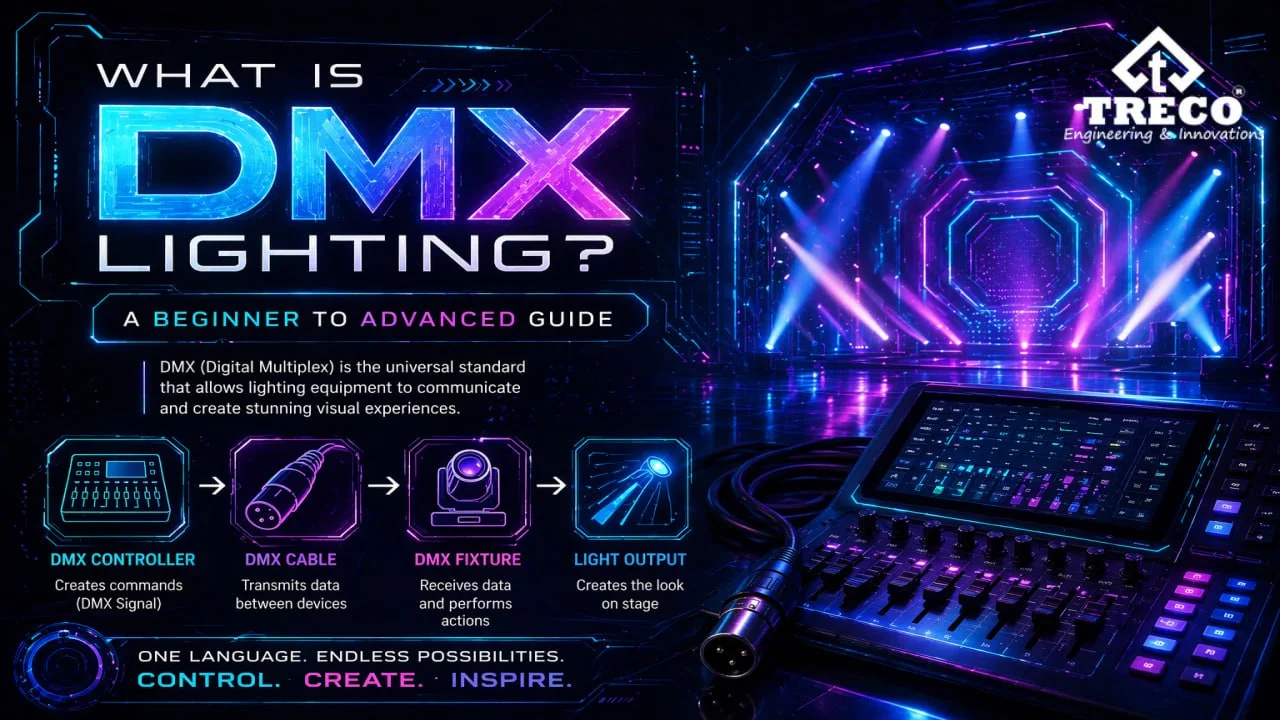
DMX lighting is a digital control method used to manage compatible lighting fixtures from a controller. It is widely used for stage shows, concerts, theatres, clubs, events, architectural lighting and façade lighting because it can control brightness, colour, movement, strobe and other fixture functions with precise channel-based commands.
DMX stands for Digital Multiplex. The commonly used DMX512 standard provides up to 512 control channels in one universe. Fixtures are assigned DMX addresses so they know which channels—and therefore which control values—to respond to.
Quick Answer: DMX lighting sends digital control values from a DMX controller to compatible lights. In a DMX512 universe, up to 512 channels are available, and each channel carries a value from 0 to 255. Depending on the fixture, those channels can control functions such as dimming, colour, pan, tilt, strobe and effects.
In This Guide
What Does DMX Mean in Lighting?
DMX means Digital Multiplex. In lighting, DMX refers to a digital control method used to send commands from a controller to compatible lighting fixtures and related equipment. DMX512-A is the maintained standard in the DMX512 family.
In simple words, DMX allows lights to “listen” to a controller and follow commands. These commands can control functions such as turning lights on or off, changing colours, adjusting brightness, moving a fixture, creating fades, triggering strobes or running programmed lighting scenes.
DMX is popular because it works as a common lighting control language. Lighting fixtures from different brands can often work together if they support the DMX standard.
How Does DMX Lighting Work?
DMX works by sending digital control data from a controller to lighting fixtures. The controller sends instructions through DMX cables or wireless DMX transmitters. Each fixture reads the part of the signal assigned to it and performs the required action.
- Controller: The controller creates lighting commands.
- DMX cable or wireless link: The signal is sent to fixtures.
- DMX address: Each fixture reads its assigned starting channel.
- Fixture response: The light changes colour, brightness, movement or effect.
- Continuous refresh: DMX updates rapidly to keep lighting smooth and responsive.
What Is DMX512?
DMX512 is the standard form of DMX lighting control. The number 512 refers to the maximum number of control channels available in one DMX universe.
Each DMX channel can send a value from 0 to 255. A value of 0 usually means the lowest level, and 255 usually means the highest level. For example, a brightness channel at 0 may mean off, while 255 may mean full brightness.
DMX Universe, Channels and Values Explained
A DMX universe is a group of 512 channels. These channels are used by lighting fixtures to control different functions. A simple RGB light may need 3 channels, while a moving head light may need 10, 16 or more channels.
| DMX Term | Meaning | Example |
|---|---|---|
| Universe | A group of 512 DMX channels | Universe 1 = channels 1 to 512 |
| Channel | Controls one fixture function | Channel 1 controls red colour |
| Value | Control level from 0 to 255 | 255 = full brightness |
| Address | Starting channel of a fixture | Fixture starts at channel 17 |
DMX Channels Explained
DMX channels are the basic control points of a lighting fixture. Each channel manages one function. For example, an RGB light can use three channels for red, green and blue. A more advanced fixture can also use channels for dimming, pan, tilt, strobe, colour wheel or gobo effects.
| Channel | Common Function | Value Range |
|---|---|---|
| 1 | Red colour intensity | 0 to 255 |
| 2 | Green colour intensity | 0 to 255 |
| 3 | Blue colour intensity | 0 to 255 |
| 4 | Brightness / dimmer | 0 to 255 |
| 5 | Strobe or effect speed | 0 to 255 |
What Is a DMX Address?
A DMX address is the starting channel assigned to a lighting fixture. It tells the fixture which part of the 512-channel signal it should respond to.
For example, if a fixture uses 4 channels and starts at address 1, it will use channels 1, 2, 3 and 4. The next fixture should usually start at channel 5 to avoid overlap.
DMX Address Calculation Example
If fixture A uses 8 channels and starts at address 1, it occupies channels 1–8. Fixture B should start at address 9. If fixture B uses 16 channels, it occupies channels 9–24, so the next independent fixture can start at 25. Fixtures may intentionally share an address only when they should perform the same functions together.
DMX Lighting Wiring: How to Connect DMX Lights
DMX lighting wiring normally follows a daisy-chain layout. The controller output connects to the first fixture input, then the first fixture output or thru connection feeds the next fixture. The chain continues in this order, with a suitable DMX terminator commonly used at the end of the wired branch.
- Connect DMX controller output to the first fixture input.
- Connect the first fixture output to the next fixture input.
- Continue the chain for all fixtures.
- Use a DMX terminator at the end of the chain when required.
- Avoid poor-quality cables because signal issues can cause flickering or incorrect responses.
DMX Cable, Connectors, Terminators and Splitters
A DMX cable carries the control data between the controller and fixtures. DMX equipment commonly uses XLR-style connectors, but the connector shape alone does not make a cable suitable for DMX data. Cable type, connector compatibility and correct termination all matter for a reliable wired setup.
| Item | Purpose | Planning Note |
|---|---|---|
| DMX data cable | Carries EIA-485-style differential data | Use cable intended for DMX/data, not ordinary microphone cable |
| 5-pin XLR | Standard connector specified for compliant portable DMX equipment | 3-pin products are common but require careful compatibility checks |
| 120-ohm terminator | Reduces signal reflections at the end of a line | Place at the final fixture on a wired branch when required |
| Optically isolated splitter | Creates proper branches and isolates faults | Do not create uncontrolled Y-splits with passive cables |
Wired DMX vs Wireless DMX
| Type | Best For | Advantages | Limitations |
|---|---|---|---|
| Wired DMX | Stage, theatre, permanent installations | Stable, reliable and preferred for professional use | Requires proper cabling and planning |
| Wireless DMX | Events, temporary setups, difficult cable routes | Faster setup and fewer visible cables | Can be affected by signal interference |
Where Is DMX Lighting Used?
DMX lighting is used wherever precise and synchronized lighting control is required. It is especially useful for dynamic lighting environments where colour, brightness and effects change frequently.
- Concerts and live stage shows
- Theatres and auditoriums
- DJ events, clubs and entertainment venues
- Hotels, lounges and premium interiors
- Architectural and façade lighting
- Showrooms, malls and commercial spaces
- Film, studio and production lighting
- Event lighting and temporary installations
Advantages of DMX Lighting
- Precise control: Manage brightness, colour, effects and movement accurately.
- Real-time response: DMX updates quickly for smooth transitions and live effects.
- Scalable setup: Multiple universes can be used for large installations.
- Wide compatibility: Many professional fixtures support DMX control.
- Creative flexibility: Useful for scenes, effects, fades, chases and synced lighting.
Limitations of DMX Lighting
- One DMX universe is limited to 512 channels.
- Addressing and channel planning can be confusing for beginners.
- Poor wiring can cause flicker, signal loss or incorrect fixture behaviour.
- Wireless DMX may face interference in some environments.
- Large systems require proper planning and professional setup.
DMX vs DALI Lighting Control
DMX and DALI are both lighting control protocols, but they are designed for different purposes. DMX is commonly used for fast, dynamic, creative lighting. DALI is commonly used for building lighting control where stable everyday operation is more important than fast effects.
| Feature | DMX | DALI |
|---|---|---|
| Main Use | Stage, events, façade and dynamic lighting | Building and commercial lighting control |
| Speed | Fast real-time control | Slower and more stable control |
| Channel / Device Limit | 512 channels per universe | Typically up to 64 devices per line |
| Best For | Effects, colour changes and live shows | Offices, buildings and daily lighting management |
DMX Troubleshooting: Common Symptoms
| Symptom | Possible Cause | Check |
|---|---|---|
| Random flicker | Wrong cable, reflections, loose connector or interference | Use data cable, inspect connectors and add a terminator |
| Fixture does not respond | Wrong address, mode or polarity | Check fixture mode, start address and cable pinout |
| Two fixtures move together | Shared or overlapping addresses | Calculate each channel footprint |
| Fixtures after one point fail | Bad thru connector, cable or fixture | Bypass devices one at a time |
| Network node receives no data | Universe, IP or multicast configuration issue | Confirm network settings and universe mapping |
How to Plan a DMX Lighting Setup
- List all fixtures: Note how many DMX lights, LED fixtures and effects devices will be used.
- Check channel requirements: Read the fixture manual to know how many channels each light needs.
- Assign addresses: Give every fixture a proper starting address.
- Plan wiring: Use the daisy chain method and avoid messy cable routing.
- Use terminators where needed: This helps reduce signal reflection and flickering.
- Test scenes: Check colour, brightness, movement and effects before final use.
Common DMX Lighting Mistakes to Avoid
- Using the same DMX address for fixtures that should work separately
- Overlapping channels between fixtures
- Using poor-quality or wrong cables
- Forgetting a terminator in longer wired chains
- Ignoring total channel count in a DMX universe
- Not testing lighting scenes before live use
DMX Lighting for Professional Projects
DMX lighting is useful when a project needs accurate colour control, synchronized effects, smooth dimming or programmed lighting scenes. It is commonly selected for stages, clubs, theatres, event venues, hotel ambience lighting, façade lighting and commercial display lighting.
For building-based ambience lighting or mixed lighting control, DMX can also be planned alongside lighting automation depending on the project requirement. The final setup should be planned according to fixture type, channel count, wiring distance and control needs.
Conclusion
DMX lighting provides precise channel-based control of compatible fixtures for stage, event, theatre, architectural and other dynamic lighting applications. Understanding DMX512, channels, addresses, wiring, cables and termination makes it easier to plan a setup that responds reliably and avoids common addressing or signal problems.
FAQs
What is the full form of DMX in lighting?
DMX stands for Digital Multiplex. In lighting, it refers to the DMX512 family of digital control standards used to send control values from a controller to compatible lighting fixtures and related devices.
What is DMX lighting used for?
DMX lighting is used to control functions such as dimming, colour, movement, strobe and programmed effects across one or many compatible fixtures. It is common in stage, event, theatre, architectural, façade and entertainment lighting.
What is DMX512?
DMX512-A is the current DMX512 lighting-control standard. One DMX universe provides up to 512 control slots, usually called channels, and each channel carries a value from 0 to 255.
What are DMX channels?
DMX channels are control positions assigned to fixture functions. One channel might control dimming, while other channels can control red, green, blue, pan, tilt, strobe or effects. A single DMX universe provides up to 512 channels.
What is a DMX address?
A DMX address is the starting channel assigned to a fixture. If a fixture starts at address 1 and uses four channels, it occupies channels 1–4; the next independent four-channel fixture can start at address 5.
What is a DMX universe?
A DMX universe is one set of up to 512 DMX control channels. Larger lighting systems can use multiple universes when the total channel requirement exceeds one universe.
What is a DMX controller?
A DMX controller is the control source that creates and sends DMX channel values to compatible fixtures. It can be a dedicated lighting console, hardware controller or a computer-based system with suitable DMX output hardware.
Can DMX lights work without a controller?
Some fixtures can run built-in standalone or automatic programs without an external controller. However, to control those fixtures through DMX, a compatible DMX data source or controller is required.
How do you connect DMX lights?
DMX lights are normally connected in a daisy chain: controller output to the first fixture input, then fixture output/thru to the next fixture. A suitable terminator is commonly used at the end of a wired branch, and proper DMX/data cable should be used.
Are DMX and XLR the same thing?
No. DMX is a lighting-control standard, while XLR is a connector format. DMX equipment commonly uses XLR-style connectors, but an XLR connector or ordinary microphone cable is not automatically equivalent to proper DMX data cabling.
Is DMX lighting still relevant?
Yes. DMX512-A remains a maintained professional lighting-control standard and is still widely used where reliable channel-based control of lighting fixtures is required.